Arjuna · Dvani for schools

Connect individual practice with classroom teaching.

Arjuna brings Dvani's slate-and-connected-notebook learning into a school programme. Students practise and ask questions; teachers use assignments, feedback and progress information to decide what comes next. The teacher reviews what Dvani suggests, and keeps the judgement.

Discuss a school pilot Three ways to deploy Priced against your deployment — talk to us
The slate on a desk showing a lesson map

Every student, a personal tutor. Every teacher, a full class of one.

Classrooms haven't changed in a century. Attention has. Dvani gives every child an always-patient, always-available companion — on electronic paper that respects the way children learn and the way parents parent.

It is the same slate a family buys as Ekalavya. Arjuna is how a school buys it: with a teacher console, class analytics, and the teacher's mark over the machine's.

Asks

Before it answers

Every mode opens with a question, so a student who wanted the answer copied out has to think first.

Senses

Their handwriting

Work is done in ink, on paper, in their own hand. The notebook senses the pen through the page — no camera in the classroom — so the working can be marked stroke by stroke, showing where the thinking went wrong, not just the answer.

1 : 1

Companion per student

No shared screens and no distraction apps. A device built for one job only: learning.

It does the first pass. She is the examiner.

Homework comes back marked

Answered on ordinary paper in the student's own hand, read by the device, returned with the working shown rather than a bare score.

Every mark can be changed

Whatever Dvani gave, a teacher can overrule. She is the examiner; it did the first pass.

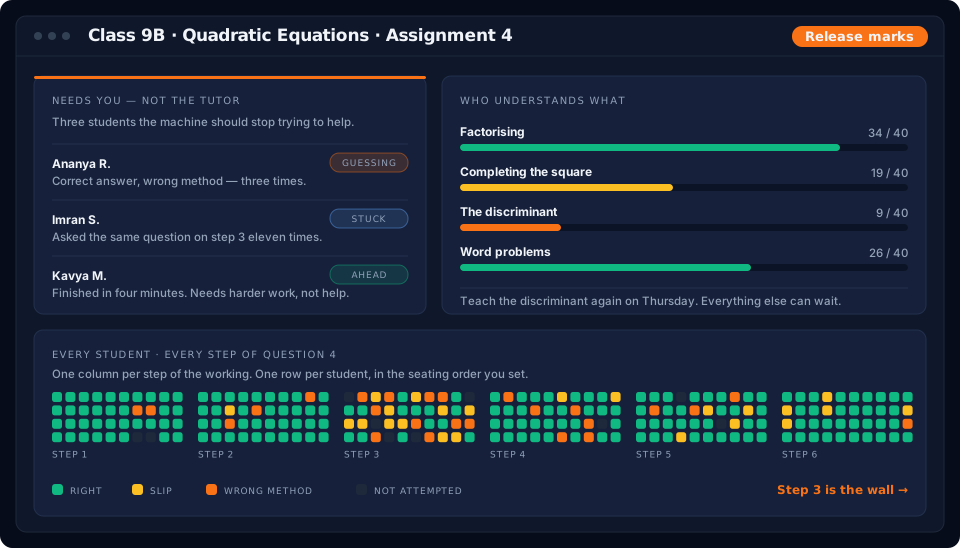
She can see where the class is stuck

Who is struggling, who is ahead, and which step the whole room got wrong.

Parents see their own child's work

And only once they have agreed to it. Weekly progress goes home automatically; they see growth, not screen-time.

The teacher console for one assignment: a Needs you panel naming three students and why, concept mastery bars, and a step-by-step heat map of the class showing step 3 as the wall.

Deployed the way your school works.

Three deployment models. One companion. Devices are quoted separately against your roll and the model you choose.

Model A

1-to-1

Every student gets a device that stays with them through the year. Maximum time-on-task and personalisation.

Best for premium schools and higher grades.
Model B

Shared lab

Devices live in a rotating lab and classes book slots by period. Lower capex, still the full companion while it is in their hands.

Best for larger cohorts and mixed budgets.
Model C

Take-home

Devices go home at night for revision, reading and parent-guided practice. Weekly usage reports come back to the school.

Best for after-school and boarding programmes.

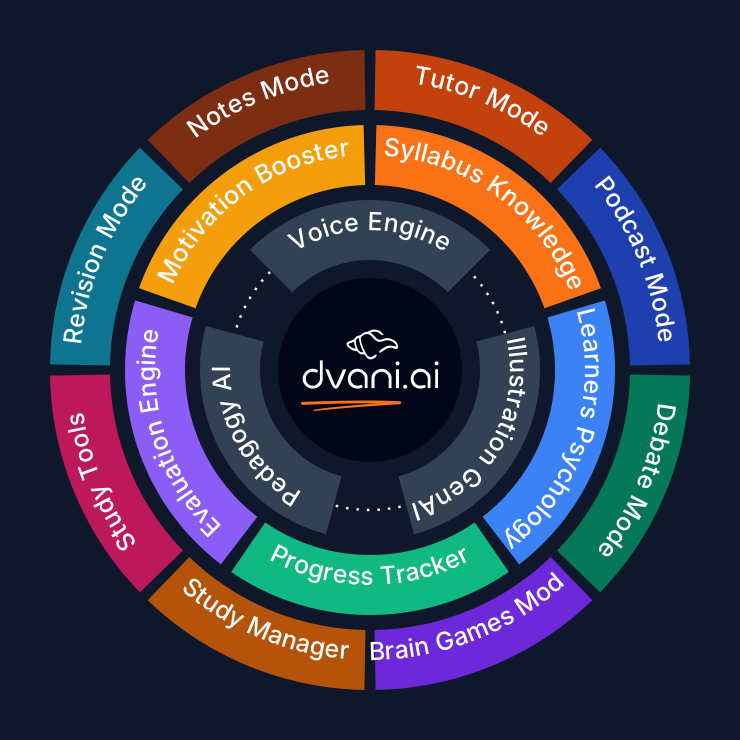
One companion. Eight modes. Every student, and their teacher.

Each student gets the same learning experience as at home: Lesson mode for guided explanation, Podcast mode for hearing a topic discussed, and Brain Gym for logic and reasoning practice. Chess runs on the device itself, so a student plays classmates inside your school rather than strangers online.

The teacher sits outside the ring and sees all of it.

The Dvani platform wheel

Priced against the deployment, not from a list.

School pricing depends on the deployment — how many students, whose devices, how the slates are shared or assigned, and which subjects. We would rather quote your situation than publish a per-seat number that turns out not to fit it. Hardware is quoted separately.

A pilot starts with a conversation about scope: which grade, what you would want to see working, and how long you would want to run it. We will agree the size, the success measures and the commercial terms together rather than offering a fixed package.

Quoted against your deployment
What we will want to understand before quoting:
  • Which grade and which subjects
  • How many students, and whether slates are assigned, shared or taken home
  • What you would want to see working before going further
  • Who owns the rollout on your side

Student work is not used to train models, and audio is not retained. Integration with an LMS or SIS is not built — earlier copy here claimed LTI support for Canvas, Moodle and Google Classroom, and that was not true.
Which boards are supported?

CBSE and ICSE, chapter by chapter, paper by paper. Regional and state boards are mapped on request during the pilot.

How is student data handled?

What a student says becomes text and the audio is deleted. We don't copy their voice, and nothing they say trains anything. Nothing is sold to third parties, and there is no advertising. Built to DPDP, COPPA and GDPR requirements.

What does a rollout look like?

Discovery call, a two-week pilot in one grade, then a phased rollout with onboarding per teacher cohort and a named contact through the year.

Do teachers need training?

One session per grade cohort, plus an open office hour each week through the first term.

Does it work without connectivity?

A lesson recorded once while online keeps the voice, the drawings and the timing, then replays with no connection at all. Useful for low-connectivity classrooms and for revision at home.

Start with a conversation about scope.

A two-week pilot, one classroom, your own chapters. We set it up and leave you the data to judge it on.

Discuss a school pilotTalk to our schools team